Google Play Store PC
Google Play is Google's digital distribution platform. On Windows, Google offers Play content through the browser and Google Play Games on PC.
52.9 MB

Speedtest by Ookla for Windows is a desktop app that measures the speed and response time of your internet connection.
Average 0.0 · ratings: 0
Thank you! Your rating is saved; you can change it. Could not save the rating. Please try again later. Too many ratings from your network today. Please try again tomorrow. The average appears after 5 ratings.
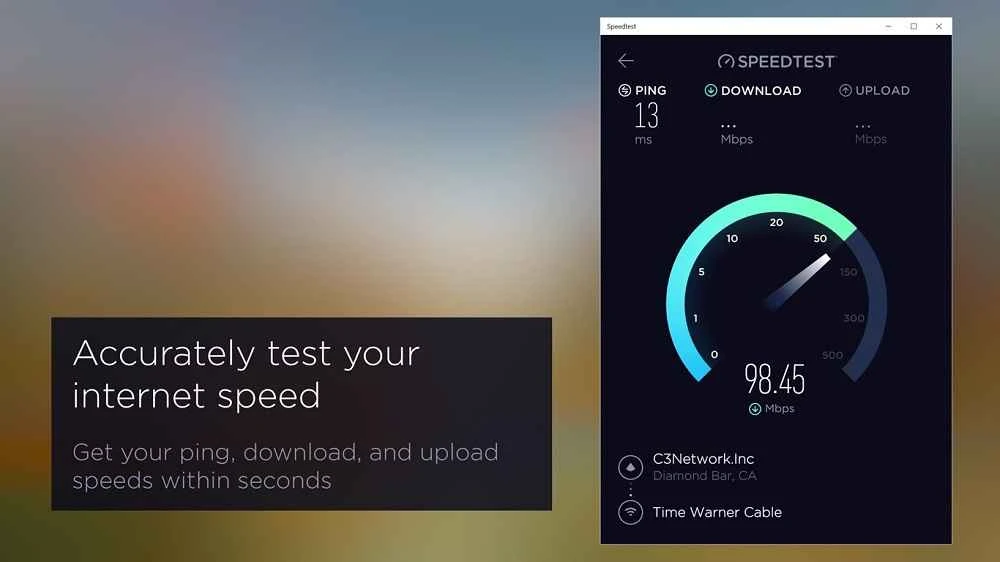
Speedtest by Ookla 1.27.200.0 is a Windows app from Ookla that measures your internet connection: download speed, upload speed and ping. You can download Speedtest by Ookla for Windows free of charge through the official website speedtest.net, or run the same test in a browser.
A speed test is useful to almost anyone with an internet connection, but the desktop app suits some people better than the website. Remote workers can check their line before an important video call. Gamers can see ping and stability without opening a browser tab that itself uses resources. People who pay for a fast plan can test regularly and keep the results as evidence when talking to their provider. IT staff and technicians can compare the connection on different PCs in an office, and anyone who just changed the router or moved it to another room can see whether things got better or worse. If you check your speed only once a year, the website at speedtest.net is enough; the app is for those who test often or want the test one click away on the taskbar.
Connect the PC with a cable if possible, because Wi-Fi adds its own limits. Pause downloads, streaming and cloud sync on all devices at home before testing. Run several tests at different times of day: evening results are often lower when many people are online. If the numbers are far below your plan on a cable connection, restart the router and test again before contacting your provider.
Download speed affects how fast pages, videos and files arrive. Upload speed matters for video calls, sending large files and cloud backups. Ping shows how quickly the connection reacts, which is what gamers and people in online meetings notice most. A good download result with a high ping can still feel sluggish in games, while a modest download speed with low ping may be fine for calls.
The app is free. Install it only from speedtest.net or the official store listing it links to; fake speed test apps that come bundled with adware do exist. Keep in mind that any speed test service sees your IP address and provider.
Our listings include NetSpeedMonitor for watching traffic in the taskbar and DNS Benchmark for testing DNS servers.
Google Play is Google's digital distribution platform. On Windows, Google offers Play content through the browser and Google Play Games on PC.
Media Creation Tool is a free Microsoft utility that downloads Windows and turns it into a bootable USB flash drive or an ISO file.

LDPlayer is an Android emulator for Windows that runs mobile apps and games on a computer.

BlueStacks is an Android emulator for Windows that lets you run Android apps and games on your PC.
Rufus is a free Windows utility that turns a USB stick into a bootable installer. The current version is 4.15.

PC App Store is a free software store for Windows from Baidu for finding, installing and updating PC programs. This page covers version 5.0.1.8682.

Uptodown App Store for Windows is the desktop client of Uptodown, a marketplace for desktop software and mobile apps. This page covers version 1.0.3.
NoxPlayer is a free Android emulator from Bignox for Windows and macOS that runs mobile games and apps on a computer with keyboard and mouse control.